Multi-Projector Fusion and Edge Blending: The Basics for Large Spaces
How multiple projectors become one giant seamless image: overlap, blending curves, geometry correction and the network approach modern all-in-one systems use.
Why One Projector Is Never Enough
Throw distance, resolution and brightness set a hard limit on how large a single image can be. Large interactive floors, immersive corridors and panoramas are built from multiple projectors — the engineering challenge is making N images look like one.
The Three Ingredients
1. Overlap
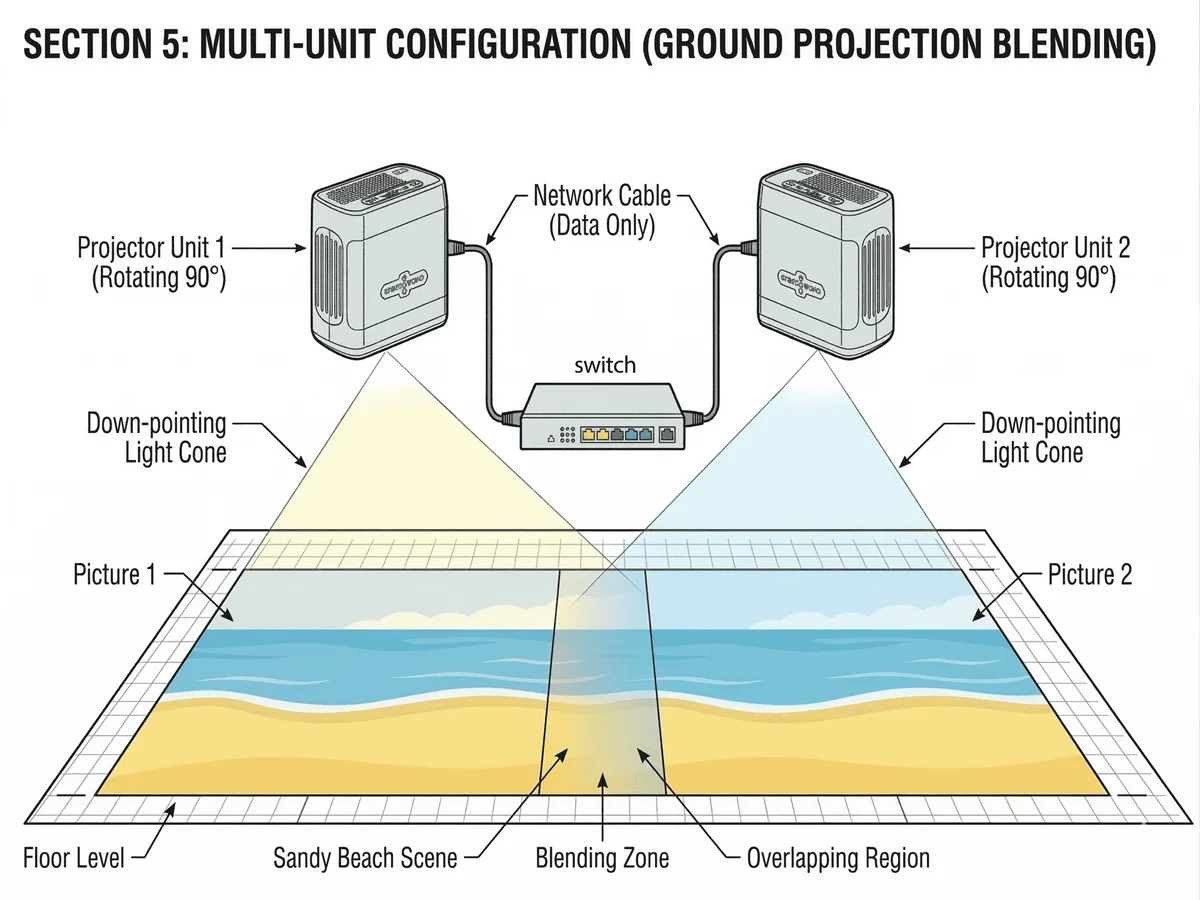
Adjacent projector images are arranged to overlap by roughly 15–30%. The overlap zone is where the magic and the danger live: unmanaged, it shows as a double-bright band.
2. Edge blending (feathering)
In the overlap zone, one image fades down as the other fades up — a blend curve that results in uniform brightness. Good fusion systems let you tune the curve width and gamma to match real-world projector differences.
3. Geometric correction
Real rooms have angled walls and uneven mounts. Keystone and grid (mesh) correction warp each projector's output so the combined image lines up perfectly on the physical surface.
The All-in-One Approach
Traditionally, fusion meant a PC with expensive blending software. Modern all-in-one systems like ours do fusion over the network: connect units to a switcher, run an auto-calibration, and the system stitches the interactive canvas itself. Our IN1016 units scale from one unit to large playgrounds this way — expanding later is a plug-and-network job, not a redesign.
Practical Tips
- Keep projector models, lenses and heights matched within a fusion group
- Plan content at the combined canvas resolution from day one
- Re-run calibration after any physical repositioning